Google Business Profile verification team rejects verification videos all the time and for several different reasons. If your video verification submission was rejected, don’t immediately record another video without understanding what went wrong.
When Google rejects a verification video, it often provides hints about why it made that decision. Here’s an example of the accompanying email you’ll get.
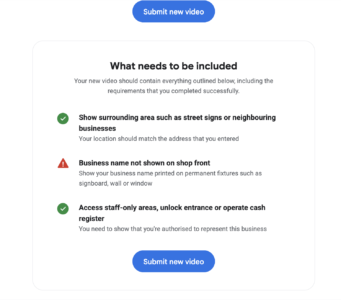
As shown in the email above, Google has provided you with 3 categories of issues that your verification video must address before it is accepted.
So, let’s talk about what your verification video should show!
What Should I Show in my GBP Video Verification?
If you’ve been offered a chance to submit a video or a live video verification, Google expects you to demonstrate both the business location and your management of the business.
Depending on your business, this includes:
1. Show surrounding areas
Google expects you to demonstrate your business location and/or its surroundings (such as street signs or neighboring businesses) whether you’re listing a Google Business Profile with a physical address or a Service Area Business (SAB) with a hidden address.
For a Google Business Profile with its physical address showing, you are expected to show the street signs, surrounding businesses, access to the place of business, and more to prove legitimacy and to establish that your business is located where you claim it to be.
For a SAB, you are expected to show that the verification video is being taken within the service area that you’ve claimed your business operates. So, a landmark, business building, or anything that puts you within that primary service area is acceptable.
2. Business Name or Signage
You’re expected to show permanent signage, business name on building, and other permanent markings of your business name if showing a physical address on your Google Business Profile.
As a SAB, it’s perfectly fine to show equipment, branded work trucks, and other branded materials – along with business documents to prove ownership.
3. Access Staff-Only Areas
This is a very important criteria for Google Business Profiles that have listed a physical address. Google expects you to be able to access the building you claim to operate from and access the inner rooms, including offices, storage, production areas, and more.
How to take the perfect Google Business Profile Verification Video
This is simple. I encourage business owners to try their best to tick all three requirements in a single 1 – 3 minute video. Here’s how.
- Google Business Profile video verification must be taken on your phone or similar portable, handheld device.
- Start the verification video from the exterior of your business and show things like surrounding businesses, street signs or markings, permanent business signage out front or business name in building directory.
- Proceed to show any business equipment available, including branded work trucks, equipment, products, and more.
- Access the building by unlocking the main entrance. Proceed to the inner offices and show products, equipment, and a brief of the business’ interior.
- Show some business documents (hard copy or soft copy on computer is fine). Preferred documents include business insurance with business name and address correct, recent utility bills, business registration document, DBA, or others.
Can Google Manually Verify My Business?
Google’s current guidance indicates that businesses that can’t complete verification through the available methods should contact support. Support may then determine what assistance is available for the specific profile.
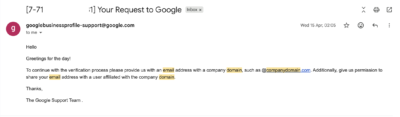
Depending on the circumstances, Google may ask for additional information or provide another verification process. In some cases, Google’s verification team may request a domain-tied email address before manually verifying your business.
What Documents Should I Have Ready?
Before contacting Google, I recommend putting together a simple evidence package.
For a Storefront Business
Consider preparing:
- Business registration
- Business license
- Lease agreement
- Recent utility bill
- Exterior signage photos
- Interior photos
- Website showing matching business information
For a Service-Area Business
Consider preparing:
- Business registration
- Insurance certificate
- Utility bill or business address documentation
- Branded vehicle photos
- Equipment photos
- Branded uniform photos
- Website showing your service areas
- Other evidence of active business operations
For a Business Using a Different Legal Name
Have documentation that connects the legal entity to the customer-facing brand. This could include:
- DBA documentation
- Business registration
- Business license
- Official business documents
- Website information establishing the relationship
Need Help With Google Business Profile Verification?
Facing several failed video verification attempts? Let our team guide you through the entire process end-to-end. Our business listing verification team can walk you through the video verification process so you cover everything necessary. Depending on your business location, we may also be able to handle the entire video verification process for you, so you can focus more on your business instead of dealing with the Google Business Profile support team.
We offer a free, optional 30-minute consultation to go over the business profile and your past verification attempts. Our team takes things from there on, requesting necessary documents and handling the entire verification pipeline, including a complete guide through any enabled verification option provided by Google.
Ready to get started?